第三部|可靠執行 · 第 6 章
Reducer、Planner 與 Recovery
以 pure reducer 重建狀態,再由 planner 區分 retry、replay、interrupted 與 blocked。
一句話掌握本章核心:崩潰重啟後最危險的直覺,就是「把上次沒做完的指令再跑一次」。tiny-agent 將復原判斷拆成兩個 Pure Functions(純函式):第一步由 WAL bytes還原狀態(Reducer)。第二步比對當前環境與設定,產生復原計畫(Planner)。真正的 I/O 留給外層 Runtime 執行。
兩個不執行外部 Effect 的 Pure Functions
將狀態計算與外部 I/O 分離,能讓復原決策更容易重播與測試。可預測性仍取決於嚴格解析、不變量與外層 executor 是否正確遵守計畫:
1. Reducer(純狀態重組): reduceSession(wal_bytes) ──────────→ SessionState
2. Planner(純復原規劃): planRecovery(state, currentConfig) ─→ RecoveryPlan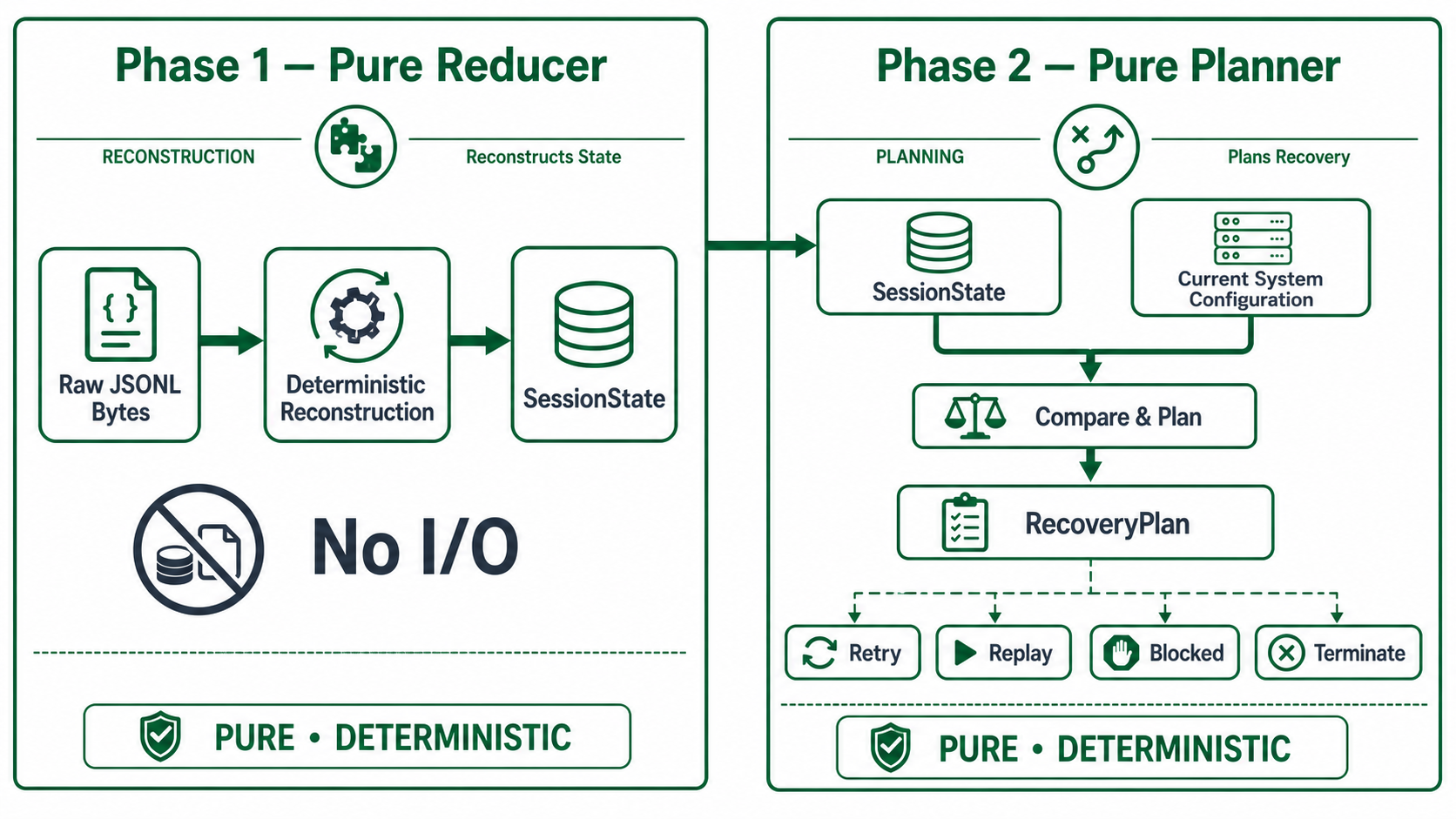
| 模組名稱 | 輸入參數 | 輸出結果 | 設計鐵律 |
|---|---|---|---|
| Pure Reducer | JSONL 原始位元組串流 | SessionState 記憶體物件 | 完全不接觸 I/O、不認識當前 Model 與環境,純粹依據歷史日誌進行數學狀態轉移。 |
| Pure Planner | SessionState + 當前執行環境設定 | RecoveryPlan 結構化計畫 | 不寫入磁碟、不發送 API、不分配 UUID,僅輸出下一步的行動決策。 |
RecoveryPlan 與常見復原語意
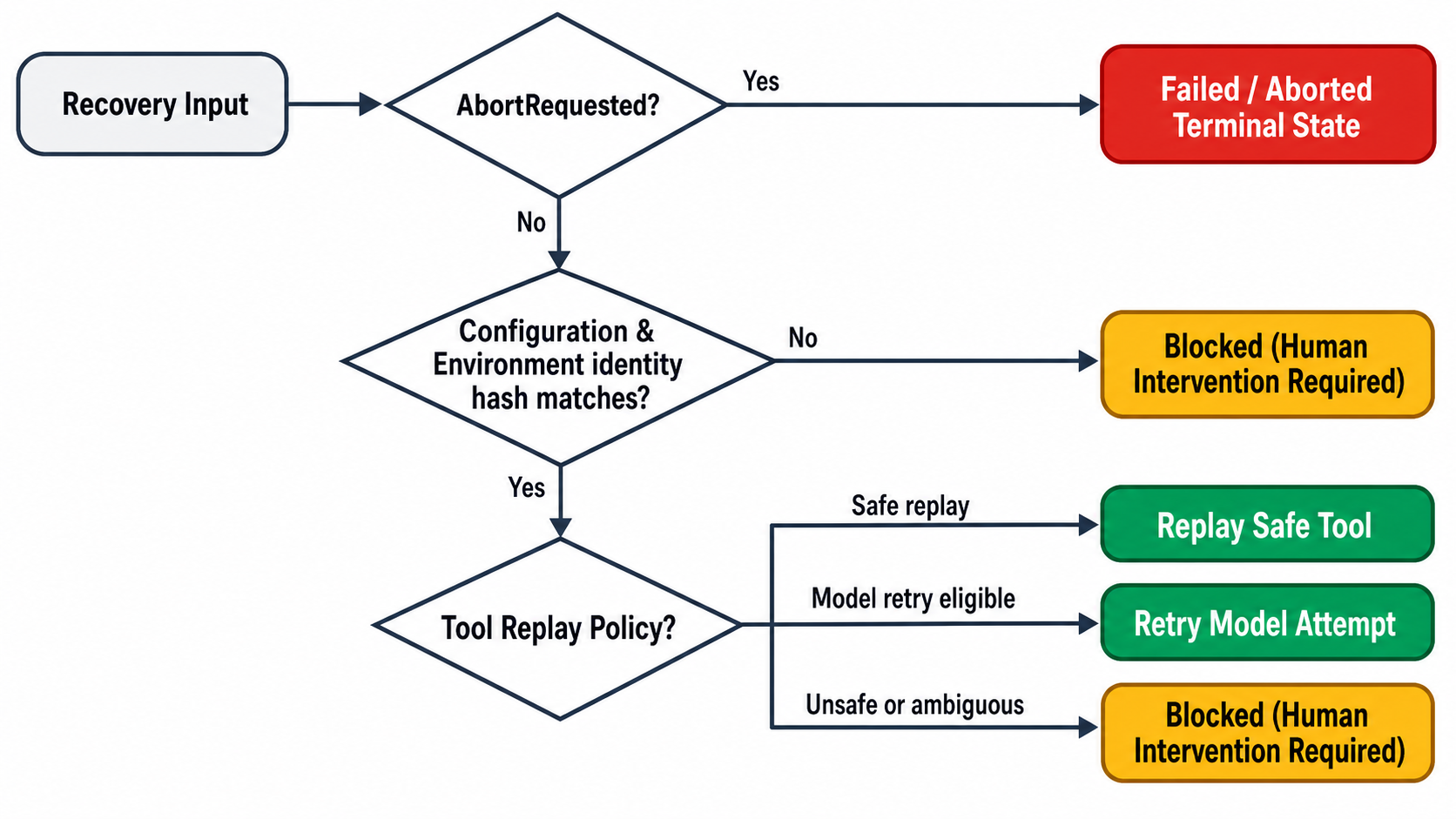
實際 RecoveryPlan 是 finish | startStep | startTool | appendSynthetic | closeAttempt | blocked 的 discriminated union。下表用較高階的語意解釋其中常見分支。它不是型別本身的完整列舉:
| 復原結局 | 精確定義與適用情境 | 處理方式與責任方 |
|---|---|---|
| Retry | 模型請求重試:WAL 顯示前次 attempt 尚未結算。 | 以記錄的 context boundary 再發送一次請求。configuration 必須相符,且最多進入 Attempt 2。這不是 exactly-once,輸出、路由與費用仍可能不同。 |
| Replay | 安全工具重放:已寫 toolStarted、結果未知,且 persisted/current replay declaration 與 implementation identity 相符。 | 目前內建工具僅真正的 builtin:read:v1 會標為 safe。重新讀取時檔案內容仍可能已改變。 |
| Blocked | 相容性阻斷:configuration、environment 或 safe replay declaration 不一致。 | 停止自動 effect 並拋出 blocked error,不寫終局。但 attempts_exhausted 是例外:一般 run 由 executor 轉成 failed 終局,compaction 則維持 blocked。 |
| Finish / Synthetic | 已存在 stepFailed、正常/截斷/取消終局,或需要補 interrupted、truncated 等 synthetic result。 | Planner 只描述下一步。resumeSession() 才 append facts、呼叫 model/tool 或完成 operation。 |
三道 Identity / Compatibility 檢查
在發動 Retry 或 Replay 前,Planner 會比對三類 identity。它們用來判斷復原相容性,不是 MAC、signature 或防惡意改寫的 tamper proof:
- Configuration Identity 閘門:
比對 Model、System Prompt digest、排序後的 Tool definitions,以及 adapter/routing/output identities。正常升級 Model、Prompt 或 Tool Schema 也可能得到configuration_changed。這代表不相容,不等同偵測到竄改。 - Environment Identity 閘門:
比對 header/tool intent 記錄的 environment identity 與復原時計算值。預設 identity 來自建立 Session 時 cwd 的 canonical realpath,也可由部署環境覆寫。不是以 JSONL 檔案本身的位置直接判定。 - Replay Declaration 閘門:
比對 persisted/current tool definition、replay declaration 與replayKey。Runtime 同時拒絕同一工具清單中的 duplicate names,且只有內建readTool物件會被標為 safe。自訂同名read不會自動取得 safe replay。
Planner 核心決策對照矩陣
| WAL 復原日誌狀態 (Durable Prefix) | Planner 確定性決策 (Recovery Action) |
|---|---|
| Run 已接受,尚未發起任何 Model Attempt | 發起 startAssistantAttempt(1) |
| Attempt 1 處於 Open 狀態,未收到完整 Response | 若 Config 一致則發起 Attempt 2。若不符則判定 Blocked |
| Attempt 2 仍處於 Open 狀態 | Planner 回 blocked: attempts_exhausted。一般 run 的 executor 接著寫 failed 終局,compaction 則停止並回報 blocked。 |
Provider 回傳 length 截斷且包含殘缺 Tool Calls | 補寫 truncated synthetic results,絕不執行 |
內建 read 工具已記錄 toolStarted,缺少 Result | 比對環境一致後發起 Replay |
危險工具(bash/write/edit)記錄 toolStarted,缺少 Result | 補寫 interrupted synthetic results,絕不重跑 |
模型輸出完畢,缺少 operationFinished 標記 | 補齊 operationFinished 終局記錄 |
深度解析:Pure Planner 的判斷狀態機與邊界條件
planRecovery() 是一個純粹的決策函式,接收已還原的 SessionState 與當前環境的 CurrentConfiguration,產出下一步行動。它不產生任何副作用,也不分配 UUID。
以下為 Planner 在處理中斷與崩潰時的核心決策管線,其優先順序嚴格依循系統不變量:
// 決策優先順序管線 (Decision Pipeline Priority)
1. 檢查是否處於 idle 狀態 ──→ 是則直接回傳 finish(completed)
2. 檢查 abortRequested 標記 ──→
   ├─ 若正在進行模型 Attempt ──→ 產出 closeAttempt(aborted)
   ├─ 若存在未結算的 Tool Calls ──→
   │    ├─ 對於已開始但未完成的 Tool ──→ 產出 synthetic(interrupted)
   │    └─ 對於尚未啟動的後續 Calls ──→ 產出 synthetic(aborted)
   └─ 否則 ──→ 產出 finish(aborted)
3. 檢查環境與設定一致性 (Identity Check) ──→
   ├─ configurationDigest 不吻合 ──→ blocked("configuration_changed")
   └─ environmentIdentity 不吻合 ──→ blocked("environment_changed")
4. 檢查模型嘗試次數 (Attempt Cap) ──→
   ├─ attempt === 1 且未完成 ──→ startStep(attempt: 2) 發起重試
   └─ attempt === 2 仍未完成 ──→ blocked("attempts_exhausted")
5. 檢查工具重放安全性 (Replay Policy) ──→
   ├─ 未開始且合法之 Tool ──→ startTool 派發執行
   ├─ 已宣告 safe 且 key 相符 ──→ replay 重放
   └─ 危險工具 (never) 或未知工具 ──→ 補寫 synthetic 結果,阻斷重跑
為什麼需要區分 interrupted 與 aborted?
當模型在單一回覆中一口氣回傳多個 Tool Calls(平行呼叫)時,若在執行第一個 Tool 途中遭遇中斷:
- 第一個已經發動副作用(例如執行 Shell)的 Tool,其真實狀態未知,標記為
interrupted。 - 後續排隊中、根本尚未開始執行的 Tools,則明確標記為
aborted。
這樣既維護了 Transcript 的配對契約(每一個 Tool Call 都有對應的 Tool Result 結算),又誠實反映了副作用的真實物理狀態。
動手驗證 (Hands-on Lab)
本實驗分為兩部分:首先透過 TypeScript 離線測試驗證 Planner 的 16 種邊界決策。接著利用命令列手動製造一個「未完成的 Tool Call」日誌,親眼觀察 Planner 如何拒絕盲目重跑危險指令:
實驗一:執行離線 Planner 決策測試矩陣
在 typescript 目錄下執行內建的狀態還原與決策測試:
cd typescript
# 執行所有 Session Reducer 與 Recovery Planner 的確定性測試 (共 70 項驗證)
npx tsx --test tests/session-reducer.test.ts
你將看到包含 start-run-step、retry-attempt、replay-safe-tool、interrupted-never-tool 與 attempts-exhausted 等所有狀態轉移測試全數通過,且耗時不超過 200 毫秒。
實驗二:實機模擬崩潰與安全合成結算 (Synthetic Reconciliation)
我們手動模擬一個極端場景:模型提議呼叫 bash rm -rf /tmp/test,系統剛寫入 toolStarted 意圖便遭遇 kill -9 崩潰。請觀察 tiny-agent 再次載入該 Session 時的行為:
# 1. 建立一個拋棄式測試目錄
scratch=$(mktemp -d)
cd "$scratch"

# 2. 透過 tiny-ts 啟動並立即產生一個 Session
# 隨後檢視 .tiny-agent/sessions/ 內的最新日誌
# 手動觀察:在遇到未結算的危險 Tool 時,系統不會重跑指令,而是自動補入 synthetic 記錄:
# {"role":"tool","content":"{\"status\":\"interrupted\",\"message\":\"Execution interrupted by process crash\"}"}核心收穫:純函式狀態機讓 Agent 的崩潰復原成為可百分之百重現、可離線單元測試的確定性邏輯,徹底終結傳統「重啟後碰運氣重跑」的混亂副作用。
透過 Reducer 與 Planner,系統能依已持久化的 prefix 做出範圍明確的崩潰復原與相容性阻斷決策。然而,在長時間運行的任務中,使用者可能會隨時按下 Ctrl+C 要求取消任務(Cancellation),或因為對話過長而需要進行歷史壓縮(Compaction)。下一章我們將深入探討 Abort Race 競爭條件與雙切點(Two-Cut)歷史壓縮。